QuadloomApply for a pilot

Aspect ratio

  1. fail
  2. 5.00 limit
  3. 4.25
  4. 3.50
  5. 3.00
  6. 2.50
  7. 2.00
  8. 1.50
  9. 1.25
  10. 1.00

crossmember_demo.stepContours of aspect ratiocrash_5mm

Sheet-metal CAD in.Solver-ready mesh out.

Quadloom heals, mid-surfaces and meshes your STEP and IGES parts the way you would by hand: washers round the bolt holes, rows across every bend, a clean row along each trim edge. Then it writes the LS-DYNA or Nastran deck, once every check passes.

min = –, at elem# –max = –, at elem# –

Paid pilot, ₹2,00,000 + GST, credited against year one if you buy. 30 days · 5 users · 1,000 part credits. See the full price list

Point at an element to see why it is meshed that way. Drag to turn the part.

Real run · 20-part demo sub-frame · internal test build: Processed in 22 s: 20 parts mid-surfaced, 24 holes filled, 144 welds placed, 43,955 elements, fixed 1584 → 0 failed

Illustration, meshed in your browser · CAD loaded

Most of a crash model is still built by hand.

Before the solver sees a single time step, someone heals the CAD, mid-surfaces every stamping, fills the small holes, puts washers round the bolt holes, lays rows across each bend, places the welds, fixes the failing elements and numbers the parts. Then the next CAD release arrives and much of it starts again.

Quadloom does that work as one logged job, and records why it made every decision, so your engineers check and correct instead of clicking.

parts meshed / engineer-day

The one number that matters. We don't quote it until we have measured it on your parts, by hand and in Quadloom. Every pilot does.

One profile. One job.
STEP file to checked deck.

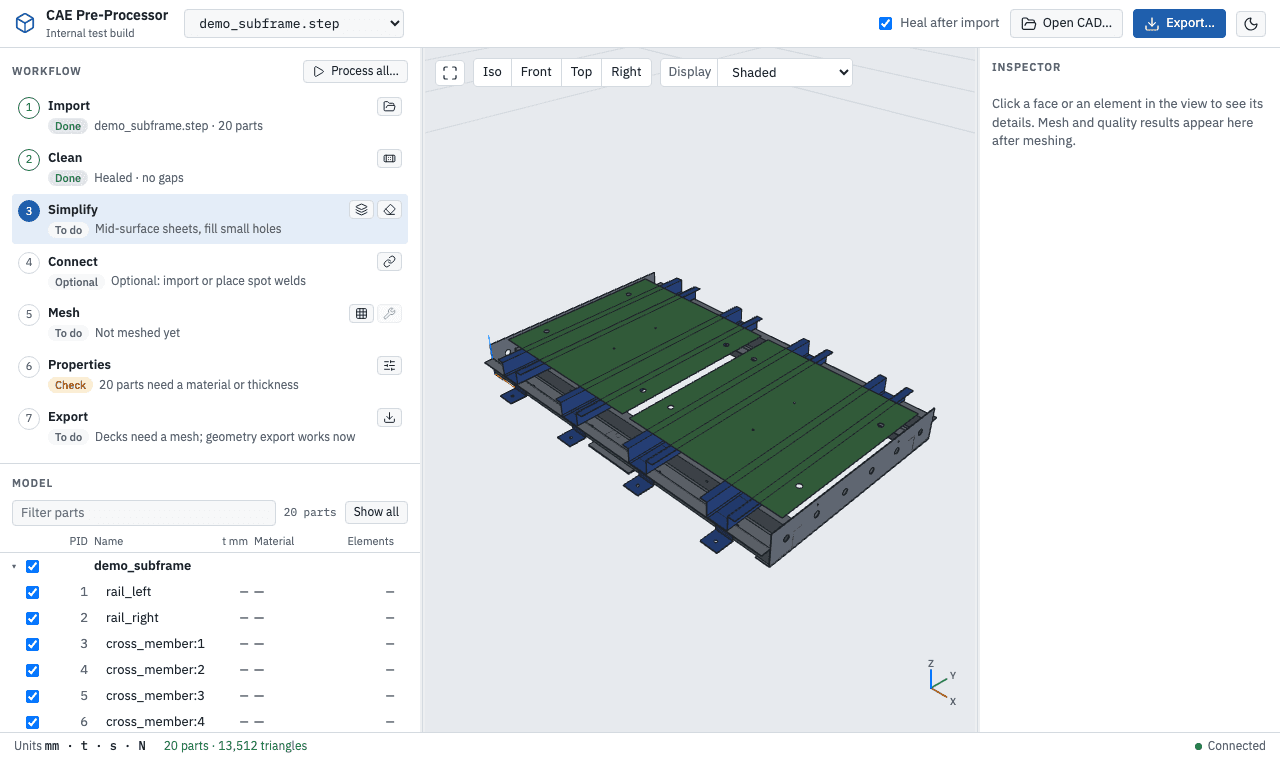
Pick Crash shells, 5 mm or NVH shells, 8 mm and press Process. Each stage runs as its own logged step and stops at the first one that fails, with the reason in the status line. This is the real test build, on a 20-part sheet-metal sub-frame.

Quadloom test build: After import: 20 parts in the tree, colours from the file.
After import: 20 parts in the tree, colours from the file.20 parts · 13,512 triangles

What Process runs, in order

Untick any stage you don't want. The step buttons run each one on its own.

  1. Heal

    Repairs shapes, removes edges under 0.05 mm and sews gaps within each part.

  2. Mid-surface

    Replaces constant-thickness sheets up to 10 mm with their mid-surface and stores the thickness.

  3. Defeature

    Merges faces on one surface. Slivers and short edges are flagged, never silently removed.

  4. Recognise

    Finds holes, fillets, bends, flanges, beads, slots, ribs and bosses, and classifies each part.

  5. Rules

    One decision per feature from your profile: fill, flatten, remove, or a mesh pattern.

  6. Mesh

    Quad-dominant shells at the profile size, with the patterns and a size field, conforming across parts.

  7. Fix

    Repairs failing elements locally and pairs stray triangles into quads. Pattern elements stay as built.

It meshes the way you would.

Quadloom recognises the features on every part, then applies your profile's rules: one decision per feature, each written as a short readable rule. Your OEM's meshing guideline becomes a profile too.

Patterns view · tap an element, or pick a rule

Crash shells, 5 mm

Hole up to 6 mm
Filled in the geometry
Bead or emboss lower than the sheet
Flattened
Logo or text
Removed before meshing

Recognised on every part

  • Holes
  • Fillets
  • Chamfers
  • Bends
  • Flanges
  • Beads
  • Slots
  • Ribs
  • Bosses
  • Logos
  • Trim edges

Parts are also classed as sheet metal, casting, plastic, machined or surface, with the evidence: “constant thickness 2 mm; 2 bends; 2 flanges”. A class you set yourself is never replaced.

Ask any element why.

Click an element and Quadloom explains it in plain sentences: the part, the feature, the rule, where its size came from, the pattern, why it is a triangle, and what the fix loop did. Nothing is a black box, and every correction you make is kept.

Illustrative records on the demo sub-frame.

Why · Element 4,817 · quad

  • quad
  • washer
  • pass
  • kept by fix

The review queue

Decisions worth a second look, most important first: impact is elements affected times a weight. Accept, reject or edit each one; your verdicts survive the next Process.

Illustrative queue on the demo sub-frame.

ItemImpactAction
Rule decision · washer not builtmount_left · hole Ø 9 mm64Edit rows
Feature below 0.8 confidencecross_member:3 · flange 11 mm38Accept
Weld failing edge distanceW117 · rail_right / floor_rear12Move
Part class uncertainmount_right · casting or sheet?6Edit class

Why is it a triangle?

Every triangle carries one of seven reasons.

made by fix
The fix loop created it while repairing a failed element
in pattern
Part of a pattern the rules asked for
narrow face
Its face is narrower than one element
no neighbour
No triangle beside it to pair with
pair fails
Any quad it could form would fail the criteria
within limit
The part is under its 5 % triangle limit
left by mesher
Over the limit: running Fix would pair it

Two meshing runs can be compared face by face: elements, triangles, failures, patterns and rule decisions that changed between, say, crash 5 mm and NVH 8 mm.

Checked before it's written.

Export runs every check first. Blocking problems stop the deck; warnings ask you to accept them by name. The deck that comes out reads in your solver with the IDs you set.

Checks before export · LS-DYNA keyword (.k)

  • 44,193 shell elements on 44,146 nodes.
  • Every meshed part has a thickness and a material.
  • IDs fit 8-column fields; part IDs are unique; every reference resolves.
  • All elements pass crash_5mm.
  • Conforming: no duplicate nodes or unintended free edges.
  • Element normals agree with their faces.
  • All 144 welds pass the connection checks.

Ready to export.

$ Quadloom export · demo_subframe · crash_5mm
$ record: demo_subframe/exports/c12.json
*KEYWORD
*PART
rail_left
         1         1         1
*SECTION_SHELL
         1        16       1.0         5
       2.0       2.0       2.0       2.0
*MAT_ELASTIC
         1   7.85E-9  210000.0       0.3
*NODE
       1       12.500000      -38.250000        0.000000
       2       17.500000      -38.250000        0.000000
*ELEMENT_SHELL
       1       1       1       2      58      57
*ELEMENT_BEAM
   90001      21  100231  100232
*CONTACT_SPOTWELD
*END
Deck excerpt, illustrative. Units mm, t, s, N.

Four ways out

LS-DYNA keyword .k
Nodes, shells, parts, sections and materials. Spot welds as beams with *CONTACT_SPOTWELD.
Nastran bulk data .bdf
GRID, CQUAD4/CTRIA3, PSHELL, MAT1. Spot welds as CBUSH with RBE3. Small or free field.
Nastran normal modes .bdf
The same bulk data plus a ready-to-run SOL 103 modal analysis.
Cleaned geometry .step .igs .brep
Healed, mid-surfaced and defeatured parts for your CAD or another pre-processor.

IDs that stay put

Part IDs are given once at import and never reused. Each part numbers its nodes and elements from its own block, so a part whose mesh hasn't changed keeps its IDs in every later deck, card for card.

Every export also writes a provenance record: the tool version, the uploaded file and its checksum, every step with its settings, the IDs and materials, the welds and the warnings you accepted.

Crash 5 mm criteria

Edge length2.5 – 8.0 mm
Aspect ratio≤ 5.0
Warpage (quads)≤ 15°
Skew≤ 60°
Scaled Jacobian≥ 0.6
Quad corner angles45° – 135°
Triangle corner angles30° – 120°
Critical time step≥ 3e-7 s
Triangles per part≤ 5 %
Added mass per part≤ 5 %

A new CAD release isn't a new model.

Compare the new file with the model you already built. Quadloom sorts every part into five classes, brings in only what changed and keeps the rest of your work: materials, thicknesses, PIDs, sizes, welds, and the mesh of every part that didn't change.

  • rail_left: Unchanged
  • rail_right: Unchanged
  • cross_member:1: Unchanged
  • cross_member:2: Changed
  • cross_member:3: Unchanged
  • cross_member:4: Unchanged
  • floor_front: Unchanged
  • floor_rear: Unchanged
  • gusset: Unchanged
  • gusset: Moved
  • gusset: Unchanged
  • gusset: Unchanged
  • gusset: Unchanged
  • gusset: Unchanged
  • gusset: Unchanged
  • gusset: Removed
  • end_plate_front: Unchanged
  • end_plate_rear: Unchanged
  • mount_left: Unchanged
  • mount_right: Changed
  • bracket_new: New
Example compare on the demo sub-frame, illustrative.
Unchanged
Keeps everything, mesh included.
Moved
Moves with its mesh and keeps everything else.
Changed
Keeps name, PID, material and size; gets the new geometry and is remeshed.
New
Added with the next free PIDs. Needs a material.
Removed
Taken out. Its welds stay and look for their sheets again.

Then process only what changed

Process everything124 s
Only the changed parts39 s

Measured on a 50 MB test assembly, about 8 % of parts changed or moved, fast workstation. Unchanged parts keep their mesh element for element.

What it does.

  • Sheet-metal parts of constant thickness: stampings, brackets, gussets, panels, as solids or surfaces
  • Assemblies with many parts, including repeated and mirrored parts
  • Crash (5 mm) and NVH (8 mm) shell meshes with washers, bend rows and trim rows
  • Spot welds from CSV or VDA xMCF 2.0, checked, in both decks
  • Stable part, node and element IDs across exports and CAD releases
  • Model checks: gaps, intersections, duplicates, penetrations, small geometry, part names
  • Compare a new CAD release, update in place, remesh only what changed
  • A Why record for every element, a review queue and run-to-run comparison

Priced per part.
Published in rupees.

Every plan is a yearly fee that includes users and a pool of part credits. Quadloom saves engineering hours, so we charge for the parts it meshes, not for seats. Prices are a year, excluding GST.

Quadloom plans, India list, per year, excluding GST
AcademicFreenon-commercialStarter₹1,50,000a year + GSTTeam₹7,50,000a year + GSTBusiness₹24,00,000a year + GSTEnterprisefrom₹45,00,000a year + GST
ForColleges, BAJA SAEINDIA and Formula Bharat teams, training institutesFreelancers and small start-upsSmall and mid CAE service firms, Tier-2 suppliersMid service firms, OEM CAE departments, Tier-1 suppliersLarge OEMs, GCCs, defence through a partner
Users10 per lab1 named user5 named users20 named usersUnlimited
Part credits a year5001,5007,50030,000Custom pool
Effective price per part—₹100₹100₹80₹75 or less
DeploymentCloud, non-commercial useCloud, India regionCloud; self-hosted once the mesher licence is signedCloud or self-hosted; SSO; one OEM rule profile included; priority supportSelf-hosted or air-gapped; SLA; audit logs
Extra credits—₹120 per credit₹120 per credit₹90 per creditNegotiated
  • AcademicFree
    For
    Colleges, BAJA SAEINDIA and Formula Bharat teams, training institutes
    Users
    10 per lab
    Part credits a year
    500
    Effective price per part
    —
    Deployment
    Cloud, non-commercial use
    Extra credits
    —
  • Starter₹1,50,000
    For
    Freelancers and small start-ups
    Users
    1 named user
    Part credits a year
    1,500
    Effective price per part
    ₹100
    Deployment
    Cloud, India region
    Extra credits
    ₹120 per credit
  • Team₹7,50,000
    For
    Small and mid CAE service firms, Tier-2 suppliers
    Users
    5 named users
    Part credits a year
    7,500
    Effective price per part
    ₹100
    Deployment
    Cloud; self-hosted once the mesher licence is signed
    Extra credits
    ₹120 per credit
  • Business₹24,00,000
    For
    Mid service firms, OEM CAE departments, Tier-1 suppliers
    Users
    20 named users
    Part credits a year
    30,000
    Effective price per part
    ₹80
    Deployment
    Cloud or self-hosted; SSO; one OEM rule profile included; priority support
    Extra credits
    ₹90 per credit
  • Enterprisefrom₹45,00,000
    For
    Large OEMs, GCCs, defence through a partner
    Users
    Unlimited
    Part credits a year
    Custom pool
    Effective price per part
    ₹75 or less
    Deployment
    Self-hosted or air-gapped; SLA; audit logs
    Extra credits
    Negotiated

Self-hosted and air-gapped installs start once our commercial mesher licence is signed. Version 1 of the price list, October 2026.

Paid pilot ₹2,00,000

30 days · 5 users · 1,000 part credits. Credited against year one if you buy. For Team plans and above.

Apply for a pilot

What would it cost you?

A 400-part body-in-white uses about 400 to 500 credits.

Estimate · India list · excl. GST

Team

₹7,50,000a year

In words
₹7.5 lakh
Parts a year
4,800
Credit pool
7,500
Per part
₹156
Pool used
64 %

Your quote confirms it. Failed parts and re-meshes within 30 days use no credits.

How part credits work

  • One credit, one part

    A credit is one body in your STEP file, cleaned, meshed to your quality profile and exported, up to 25,000 shell elements. Each further 25,000 elements is one more credit.

  • Failed parts are free

    A part that still fails your quality profile after the automatic fix loop uses no credit, unless you export it anyway. Failures above 10 % of a month's parts are charged.

  • Iterate without a meter

    Re-meshing the same geometry is free up to five times within 30 days.

  • One purchase order

    Credits come as an annual pool on a single PO. Unused credits expire at renewal. Top-ups come in packs of 1,000.

Services

OEM rule profileOne meshing guideline encoded and tested₹2,50,000 per profile
TrainingUp to 10 people₹50,000 per day
Premium supportNamed engineer, 4-hour response+15 % of plan price
Perpetual self-hosted licenceBusiness and Enterprise; part credits still bought yearly3× the annual fee + 20 % a year maintenance

Programmes

Start-ups
Product companies under five years old: Starter free in year one and 50 % off in year two, or Team at 50 % off in year one. Not for service firms.
Founding customers
Our first ten customers get a three-year price lock and 20 % extra credits, in return for a named case study and two reference calls.
Multi-year
10 % off for a two-year prepay, 15 % for three years. Annual increases are capped at 5 % in the contract.

Buying in India

  • Quoted and invoiced in rupees, on one annual purchase order
  • Paid by bank transfer; cards only for Starter
  • Prices exclude GST
  • The India list applies to contracts signed and paid by an Indian entity for use in India. Buying from abroad? Ask for the global list.

Apply for a 30-day pilot.

₹2,00,000 + GST for 30 days · 5 users · 1,000 part credits, credited against year one if you buy. You finish with a measured answer, on your own parts.

  1. Pick the parts

    A call with your CAE lead, in IST hours. We choose 20 to 50 real parts and the profile you would use: crash, NVH or your OEM's guideline.

  2. Run them

    Five of your engineers get Quadloom for 30 days with 1,000 part credits. An application engineer works alongside them.

  3. Measure

    We time each part by hand and in Quadloom, and hand you parts meshed per engineer-day, before and after. That number decides the plan.

Rather write? pilots@quadloom.com

We use these details only to reply about the pilot. Privacy

Questions CAE leads ask first.

Which solvers and file formats does Quadloom support?

Decks for LS-DYNA (keyword .k) and Nastran (bulk data .bdf, including a ready SOL 103 normal modes run). It imports STEP AP203, AP214 and AP242, IGES and BREP, with STL, OBJ and VRML as reference parts. Cleaned geometry exports as STEP, IGES or BREP. Units are mm, t, s, N. OptiStruct export is planned for 2027.

We already batch mesh in ANSA or HyperMesh. What changes?

Less time saving than against hand meshing, and we say so. What you gain is your OEM's guideline as a readable rule profile, a Why record and quality check for every element, stable IDs across CAD releases, and a lower cost per seat. That usually points to the Business plan.

Where does our CAD go?

Cloud plans run in an India region. In a pilot we agree up front which parts you upload, and you only upload geometry you are allowed to put on a cloud server. If your CAD cannot leave your network, Business and Enterprise include self-hosted and air-gapped installs, available once our commercial mesher licence is signed.

What counts as a part?

One body in your STEP file: each connected solid or sheet body, up to 25,000 shell elements. Bodies are counted, not PIDs, so merging parts doesn't change the bill. A typical 400-part body-in-white uses about 400 to 500 credits.

What if Quadloom can't mesh a part?

If it still fails your quality profile after the fix loop, it uses no credit unless you export it anyway. Some parts are out of scope today: castings, forgings, variable-thickness parts and sheets with ribs or bosses. They are left as they are or blocked, never silently half-meshed.

Can it follow our OEM's meshing guideline?

Yes. We encode one guideline as a rule profile and test it on your parts for ₹2,50,000. The Business plan includes one profile. Rules live in short text files, so a changed value takes effect at the next run.

How do we pay?

One annual purchase order in rupees, paid by bank transfer. Prices exclude GST; we confirm the tax treatment on your quote. Invoices come from Thinking Nodes GbR.

Is there a plan for students?

The Academic plan is free for colleges, BAJA SAEINDIA and Formula Bharat teams, and training institutes: 10 users per lab and 500 parts a year, for non-commercial work.